
Call: 07971406052
 Send Inquiry
 Send Inquiry
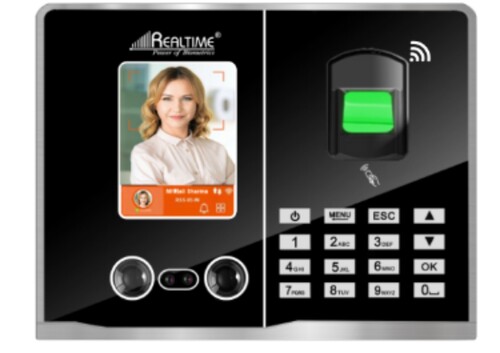
Realtime T28 plus Fingerprint Access Control With Fingerprint Reader
Price 8500 INR/ Piece
MOQ : 10 Pieces
Realtime T28 plus Fingerprint Access Control With Fingerprint Reader Specification
- Accuracy
- FRR 1%, FAR 0.00001%
- Features
- Anti-Passback, Access Time Zones, Tamper Alarm
- Automation Grade
- Automatic
- Connectivity Type
- TCP/IP, USB
- Usage & Applications
- Office, Factory, School, Server Room
- Display Type
- 2.4 Inch TFT LCD
- Power Supply
- DC 12V/1.5A
- Interface
- TCP/IP, USB
- Installation Type
- Wall Mounted
- Data Capacity
- 3000 Fingerprints, 3000 Cards, 100,000 Logs
- Operating System
- Embedded LINUX
- Weight
- 400 g
- Size
- 16.5 x 13.6 x 4.2 cm
- Scan Speed
- 0.5 Second
- Type
- Realtime T28 plus Fingerprint Access Control With Fingerprint Reader
- Material
- ABS
- Measurement
- 16.5 x 13.6 x 4.2 cm
- Usage
- Industrial
- Identification Mode
- Fingerprint, Password, Card
- Identification Time
- 1 Second
- Power
- 12 Volt (v)
- Access Control Modes
- Fingerprint/Card/Password/Combination
- Operating Humidity
- 20% to 80%
- Management Method
- PC, Device
- Sound Indicator
- Voice Prompts
- Card Type
- EM Card
- Operating Temperature
- -10C to 60C
- Fingerprint Sensor
- Optical Sensor
- Event Log Capacity
- 100,000
- Platform Compatibility
- Windows
- User Capacity
- 3000
- Voice Guidance
- Yes
- Door Unlock Relay
- Supported
- Data Download
- USB Disk Support
- Matching Mode
- 1:N
- Alarm Function
- Tamper and Door Forced Open
- Keypad Type
- Capacitive Touch
- Language
- English
- Backup Battery
- Optional
Realtime T28 plus Fingerprint Access Control With Fingerprint Reader Trade Information
- Minimum Order Quantity
- 10 Pieces
- Supply Ability
- 100 Pieces Per Month
- Delivery Time
- 7 Days
About Realtime T28 plus Fingerprint Access Control With Fingerprint Reader
Fingerprint Capacity2000
Card Capacity2000
Password2000
Attendance Records100,000
Fingerprint SensorOptical sensor 500DPI
Interlocking detectionSupport (with magnetic contact)
Reliable Biometric Security
With the advanced optical fingerprint sensor and 1:N matching mode, the T28 plus provides rapid and accurate identification within one second. Its robust design supports up to 3,000 users and 100,000 event logs, making it highly suitable for high-traffic environments where secure and efficient access is essential.
Versatile Access and Management
The T28 plus supports multiple authentication methods, including fingerprint, EM card, and password, either individually or in combination. Management is facilitated via PC or directly on the device, and data transfer is seamless using TCP/IP or USB disk. This flexibility makes it adaptable across various usage scenarios such as offices, factories, and schools.
Easy Installation and User Guidance
Installation is quick with its wall-mountable ABS case. The color 2.4-inch TFT LCD screen and voice guidance provide straightforward navigation. Capacitive touch keypad and voice prompts ensure every user interacts confidently, while the tamper and forced-door alarms reinforce physical security.
FAQ's of Realtime T28 plus Fingerprint Access Control With Fingerprint Reader:
Q: How does the Realtime T28 plus fingerprint access control system enhance security in workplaces?
A: The system combines biometric fingerprint recognition, EM card access, and password verification-individually or in combination-ensuring only authorized personnel gain entry. Features like anti-passback and tamper alarms further bolster on-premise security.Q: What is the process for adding new users to the T28 plus system?
A: New users can be enrolled via fingerprint, EM card, or password directly on the device or through a connected PC using the management software, accommodating up to 3,000 unique users for flexible access administration.Q: When should the backup battery option be considered for this device?
A: The backup battery is recommended for environments prone to power outages. It ensures the access control system continues operating uninterrupted, thus maintaining security and access records even during power failures.Q: Where can the Realtime T28 plus be effectively installed?
A: Its versatile design makes it suitable for various environments including offices, factories, schools, server rooms, and other industrial or institutional locations that require dependable access control and attendance management.Q: How do users interact with the device for authentication?
A: Users simply present their registered fingerprint, EM card, or enter a password using the capacitive touch keypad. The touch-screen and voice guidance ensure quick and clear prompts throughout the process.Q: What benefits does the event log capacity provide for administrators?
A: With the ability to store up to 100,000 event logs, administrators can easily track historical access, monitor attendance, and generate reports via USB data transfer or over TCP/IP for comprehensive security management.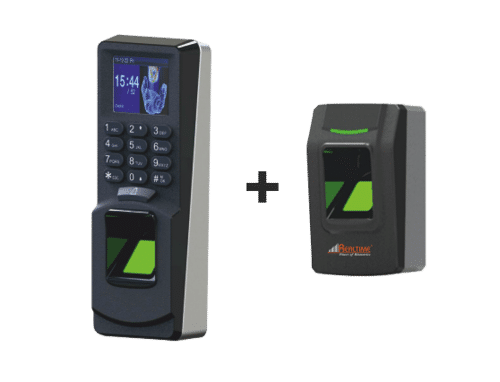
Tell us about your requirement

Price:
Quantity
Select Unit
- 50
- 100
- 200
- 250
- 500
- 1000+
Additional detail
Mobile number
Email

More Products in Real Time Biomatric Category
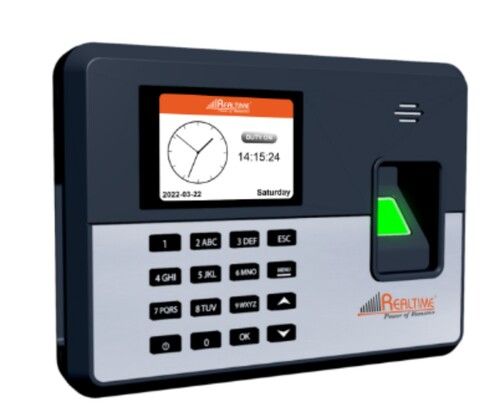
C101 Realtime Biometrics
Price 4000 INR / Piece
Minimum Order Quantity : 100 Pieces
Power : DC 12V/1.5A
Material : Realtime C101 Biometric
Usage : Office/Industrial/Employee Attendance
Type : Biometric Attendance Machine
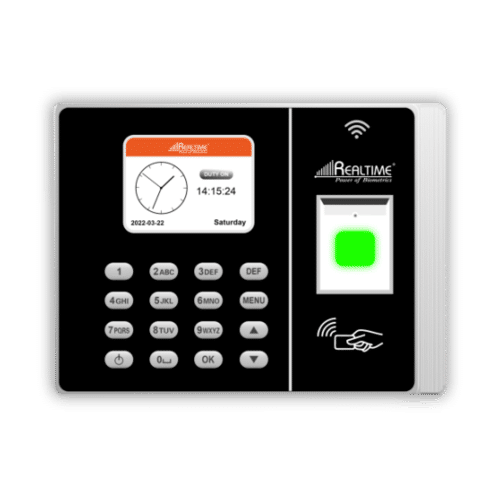
Realtime RS9W Fingerprint Biometric
Price 4700 INR / Piece
Minimum Order Quantity : 10 Pieces
Power : 30 Watt (w)
Material : ABS
Usage : Industrial
Type : Realtime RS9W Fingerprint Biometric
Biometric System
Price 4500 INR
Minimum Order Quantity : 10 Pieces
Power : DC 12 V 1.5 Ampere (amp)
Material : Plastic
Usage : Office
Type : Face Recognition
Realtime T501 Mini with Wifi
Price 9100 INR / Piece
Minimum Order Quantity : 10 Pieces
Power : 12 Watt (w)
Material : ABS
Usage : Office, School, College, Exhibition, Industry, Hospital
Type : Realtime T501 Mini with wifi

Contact Details
GST : 07AABCC7716P1Z9
- 7 Th Floor, Office No. -723, T C Jaina Tower I, Distt Janakpuri, Distt Janakpuri,New Delhi - 110058, India
- Phone :07971406052

 Send Inquiry
Developed and Managed by Infocom Network Private Limited.
