
Call: 08071791336
 Send Inquiry
 Send Inquiry
Face Recognition Access Contol
Price 15000 INR/ Piece
MOQ : 10 Pieces
Face Recognition Access Contol Trade Information
- Minimum Order Quantity
- 10 Pieces
- Payment Terms
- Cash in Advance (CID), Cheque, Cash Advance (CA)
- Supply Ability
- 10 Pieces Per Day
- Delivery Time
- 1 Days
- Sample Available
- Yes
- Sample Policy
- Sample costs shipping and taxes has to be paid by the buyer
- Main Domestic Market
- Delhi
About Face Recognition Access Contol
Face Capacity : 400Fingerprint Capacity : 500
ID Card Capacity : 1000(Optional)
Record Capacity : 80,000
Display : 2.8 inch TFT Screen
Communication : TCP/IP, USB-Host
Push Data : Yes
Optional Function : MIFARE Card,
Work Code
Dimension : 167.5 x 148.8 x 32.2 mm
Net Weight : 264 G
Advanced Biometric Security
Implementing facial recognition technology, this access control solution delivers superior security by limiting access to authorized individuals only. The high-resolution screen ensures accurate and swift identification, making it ideal for both hospitality and corporate environments.
Designed for Versatility and Ease
Suitable for a range of establishments like hotels and offices, the system is lightweight and easy to install. Its sturdy plastic build and modern black finish blend seamlessly with any decor, while the simple interface reduces learning time for users and administrators alike.
FAQ's of Face Recognition Access Contol:
Q: How does the face recognition access control system operate?
A: The system captures and analyzes facial features through its 2.8-inch TFT screen, granting or denying access based on stored data. Powered with DC 12V 1.5 amp supply, it ensures quick and accurate authentication for users.Q: What are the main benefits of using this access control in hotels and offices?
A: It greatly enhances security by allowing only registered individuals to enter, reduces the need for physical keys or cards, and streamlines entry processes for guests and employees.Q: When should you consider installing this face recognition system?
A: You should install this system when your hotel or office requires upgraded security measures, touchless access, or more efficient management of entry and exit points.Q: Where can this device be installed for optimal performance?
A: This device is best installed at main entrances, restricted areas, or secure internal doors within hotels and offices, due to its compact size and modern appearance.Q: What is the process for registering a new user?
A: Administrators can enroll new users by capturing their facial image using the device's TFT screen. The process is straightforward and can be completed in just a few minutes.Q: How is the device maintained for long-term reliability?
A: Routine cleaning of the screen and body, along with regular software updates, helps keep the device operating reliably and accurately.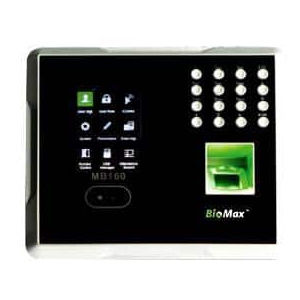
Tell us about your requirement

Price:
Quantity
Select Unit
- 50
- 100
- 200
- 250
- 500
- 1000+
Additional detail
Mobile number
Email

More Products in BioMax Products Category
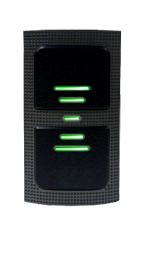
RFID Reader
Price 6000 INR / Piece
Minimum Order Quantity : 10 Pieces
Power : DC 6 14V / Max.70 Milliampere (mA)
Material : ABS
Type : RFID Reader
Color : Black
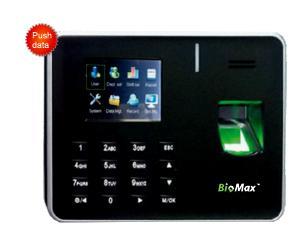
Fingerprint Access Control
Price 15000 INR / Piece
Minimum Order Quantity : 10 Pieces
Power : 5 V DC, 0.8 Ampere (amp)
Material : Plastic
Color : Black
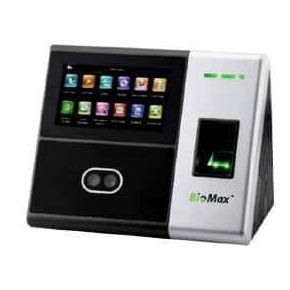
Face Recognition Access Contol
Price 18000 INR / Piece
Minimum Order Quantity : 10 Pieces
Power : 12V 3 Ampere (amp)
Material : Plastic
Color : Black& Gray
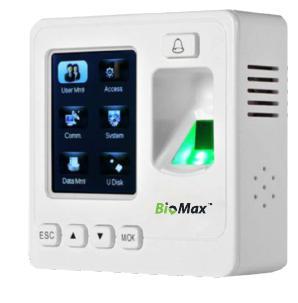
Fingerprint Access Control
Price 15000 INR / Piece
Minimum Order Quantity : 10 Pieces
Power : 12 Volt (v)
Material : ABS
Type : Fingerprint Access Control

Contact Details
GST : 07AABCC7716P1Z9
- 7 Th Floor, Office No. -723, T C Jaina Tower I, Distt Janakpuri, Distt Janakpuri,New Delhi - 110058, India
- Phone :08071791336

 Send Inquiry
Developed and Managed by Infocom Network Private Limited.
